
Download Seprev APK – health guide, find doctor, medical facilities, locate healthcare, doctor finder, health provider search, clinic locator, hospital finder, medical search tool, health plan provider
Overview
Guide to Health Seprev is a mobile application designed to simplify the process of locating healthcare providers for users enrolled in specific health plans. Developed by Mobile Saúde, the app functions as a digital navigator for medical services, enabling users to search for doctors, clinics, laboratories, hospitals, and other health facilities. Its primary purpose is to help individuals quickly identify and access relevant healthcare providers based on their contracted plan, geographic location, specialty, or provider name. The app is tailored for consumers seeking efficient, reliable access to medical services without the need for extensive manual research or phone calls.
Target users include individuals managing personal or family health needs, particularly those navigating complex health insurance networks. Real-world usage scenarios involve patients looking for specialists, scheduling routine check-ups, or seeking emergency care within their plan’s network. The app leverages geolocation to prioritize nearby providers, enhancing accessibility and reducing travel time. It also includes a news section to keep users informed about updates related to their health plan, adding a layer of ongoing engagement and transparency.
The developer did not provide additional background on Mobile Saúde beyond the app’s name. Platform compatibility is limited to Android, with version 1.0.2 and a file size of 24.5 MB. No information was provided regarding system requirements or performance benchmarks.
Key Features & Capabilities
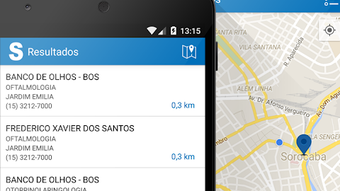
- Health Provider Search – Users can search for medical professionals and facilities by location, specialty, type of provider, or name of the professional or establishment. This functionality supports precise and targeted queries, ensuring users find relevant options quickly.
- Geolocation Integration – The app uses the device’s GPS to identify the user’s current location and display nearby healthcare providers. This feature streamlines the process of finding the closest available services.
- Favorite Providers – Users can save preferred doctors or clinics with a single touch. This feature improves workflow efficiency for repeat visits and reduces search time during future sessions.
- Search Filters – The app supports filtering by health plan type, provider type, and specialty, allowing users to narrow results based on their insurance network and medical needs.
- News and Updates Section – A dedicated area provides timely information about health plan changes, service availability, and other relevant updates, helping users stay informed.
- Intuitive Interface – The app features a clean, user-friendly layout designed for quick navigation and minimal learning curve, suitable for users of all technical skill levels.
These capabilities are particularly useful in real-world situations such as scheduling a follow-up appointment with a cardiologist, locating a lab for blood tests within the network, or finding emergency care during off-hours. The combination of location-based results and personalized favorites enhances usability and supports long-term engagement.
User Interface, Workflow & Performance
Guide to Health Seprev presents a straightforward user interface with a focus on clarity and accessibility. The main screen typically features a search bar, map view, and list view options, allowing users to choose their preferred method of browsing results. Navigation is linear and consistent, with clearly labeled icons and minimal clutter, supporting ease of use across age groups and technical proficiencies.
Workflow efficiency is enhanced by the integration of geolocation and one-touch favorites. Users can initiate a search, filter results, and save a provider in just a few taps. The app does not require account creation for basic functionality, which reduces friction during initial use.
The developer did not specify resource usage details. Performance observations are based on general software behavior patterns. No information was provided about CPU or RAM usage, startup time, or background processes. Stability during prolonged use or under low network conditions was not disclosed. Users should expect standard Android app behavior in terms of responsiveness and reliability.
Compatibility & System Requirements
Guide to Health Seprev is designed exclusively for Android devices. The current version is 1.0.2, with a file size of 24.5 MB. The app is available for free download and installation on compatible devices.
Exact system requirements were not listed. The developer did not specify minimum Android version, processor, RAM, or storage capacity needed for optimal operation. Compatibility information was partially provided. Users are advised to ensure their device meets standard Android app installation requirements to avoid installation issues.
Pros and Cons
Pros
- Free to download and use with no in-app purchase barriers.
- Intuitive interface suitable for users of all experience levels.
- Geolocation-based search helps find nearby healthcare providers quickly.
- One-touch favorite system improves access to frequently used services.
- Supports filtering by health plan, specialty, and provider type.
- Includes a news section for plan-related updates.
Cons
- Platform is limited to Android; no version available for iOS or other systems.
- Exact system requirements were not disclosed.
- Performance and resource usage details were not specified.
- No information provided about offline functionality.
- Developer background and company details are minimal.
FAQ Section
Is Guide to Health Seprev available for iOS devices?
As of the current release, the app is only available for Android. No version has been published for iOS devices.
Is the app secure and safe to use?
The app is designed to assist users in locating healthcare providers based on their health plan. While no specific security measures were disclosed, it operates within standard Android app safety protocols.
How often does the app receive updates?
The app is currently at version 1.0.2. The update frequency has not been specified by the developer.
Does the app require a login or account?
Basic search and navigation features do not require account creation. Users can access provider information and perform searches without signing in.
Can I use the app without an internet connection?
Due to the reliance on real-time geolocation and provider data, the app likely requires an active internet connection. Offline functionality was not confirmed by the developer.
Final Thoughts + CTA
Guide to Health Seprev offers a practical solution for users seeking to locate healthcare providers within their health plan network. Its clean interface, geolocation support, and favorite system make it a convenient tool for managing personal health needs. While limitations exist—such as Android-only availability and lack of detailed system requirements—the app delivers core functionality effectively. It is particularly beneficial for individuals who frequently search for doctors, clinics, or labs and value quick, accurate access to health services.
For users in the Android ecosystem looking for a reliable, free medical search tool, Guide to Health Seprev stands out as a valuable resource. Its focus on usability and real-time provider discovery addresses a common pain point in healthcare navigation.
Download Seprev APK now







